Description
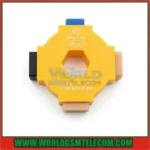
MobiTool 4-in-1 Optical Fingerprint Calibration Tool
Product Description
The Calibration Tool is a physical repair aid designed for mobile phone technicians. It helps calibrate under-screen optical fingerprint sensors when they stop recognizing fingerprints or fail to register new fingerprints after a display replacement.
Key Features
- Designed for under-display optical fingerprint sensor calibration
- Suitable for professional mobile phone repair technicians
- Supports major Android brands, including:
- HUAWEI
- Xiaomi / MI
- OPPO
- VIVO
- Four calibration surfaces in one tool
- Includes Black, Flesh, and patterned calibration targets
- Easy to rotate according to the calibration software instructions
- Helps restore fingerprint recognition after screen replacement
How to Use
- Clean the phone screen and fingerprint sensor area.
- Open the phone’s built-in factory or engineering test mode.
- Place the calibration tool directly over the fingerprint sensor area.
- Rotate the tool to the required surface according to the on-screen instructions.
- Complete the fingerprint calibration process.
Important Note
This tool is intended for trained repair technicians. Compatibility and calibration results may vary depending on the phone model, display replacement quality, and installed calibration software.