Description
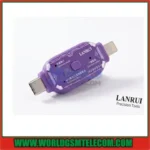
LanRui V587 One-Click DFU Tool – Universal iPhone, iPad & Android Repair Adapter
Short Description
The LanRui V587 One-Click DFU Tool is a plug-and-play hardware adapter for mobile phone repair technicians. It provides quick access to Apple DFU mode, iOS and Android recovery modes, Samsung Odin mode, and forced-restart functions without complicated button combinations or repeated cable changes.
Product Description
LanRui V587 One-Click DFU Tool
The LanRui V587 One-Click DFU Tool is a professional plug-and-play adapter designed to simplify smartphone repair and servicing. It helps technicians quickly place compatible devices into important low-level system modes, including Apple DFU mode, iOS recovery mode, Android recovery mode, and Samsung Odin or flashing mode.
Key Features
- One-click DFU access: Quickly enter Apple DFU mode without using complicated manual button combinations.
- Multiple repair modes: Supports Apple DFU mode, iOS recovery mode, Android recovery mode, and Samsung Odin or flashing mode.
- Dual-connector design: Suitable for Apple devices such as iPhone, iPad, and MacBook, as well as Android devices from brands including Samsung and Xiaomi.
- Automatic mode: Detects the connected device system through the USB-C connection and selects the appropriate mode.
- Manual mode: Use the central physical button to select the required operating mode.
- Forced restart function: Restart frozen or unresponsive devices without unplugging the cable.
- No software required: Works as a plug-and-play hardware tool without additional computer software or configuration.
- Durable construction: Made with a lightweight and durable nylon/plastic housing for regular workshop use.
Compatible Devices
- iPhone, iPad, and MacBook devices
- Samsung smartphones and tablets
- Xiaomi and other compatible Android devices
How It Works
- Connect the LanRui V587 tool to the device using the appropriate connector.
- Choose automatic mode for system detection or manual mode using the centre button.
- Select the required DFU, recovery, Odin, or flashing mode.
- Continue with the appropriate repair or software procedure.
Important: Compatibility may vary by device model, connector type, and software version. This tool is intended for experienced mobile phone repair technicians.